One of our clients wanted to get their Facebook business verified. They found a YouTube tutorial with 94,000 views and 4,700 likes, clicked the download link in the description, and installed a Chrome extension. A few hours later, strangers in two other countries were logged in to their account.
How do fake YouTube tutorials hack Facebook accounts? The video promises an easy fix for a Facebook problem, such as business verification, a restricted ad account or a disabled page. The description or pinned comment links to a Google Drive download that contains a malicious Chrome extension. The video shows you how to install it in Chrome’s Developer mode. Once it’s installed, the extension can steal your Facebook login session. The attacker then adds their own email and Meta account to lock you out.
The four warning signs: (1) a download link in the description or pinned comment instead of a link to facebook.com, (2) instructions to turn on Developer mode or install a file from outside the Chrome Web Store, (3) a comment section full of generic praise, and (4) commenters with formula handles like @FirstnameLastname-x7k.
What happened to our client
The client runs a small professional services firm. Facebook kept telling them their business portfolio was “Unverified”, and they wanted the Meta Verified badge. They searched YouTube for “how to verify business on Facebook 2026”.
The top result looked legitimate:
- A polished title: How to Verify Business on Facebook in 2026 | Get Verified Business Portfolio Step-by-Step
- A channel with a Facebook-sounding name and about 49,000 subscribers
- 94,000 views, 4,700 likes, and 255 comments
- A screen recording of the real Meta Business Suite
The description said the tutorial “uses a simple Chrome extension to make the entire verification process easier.” Under that was a DOWNLOAD link to a Google Drive file. The same link was pinned as the first comment.
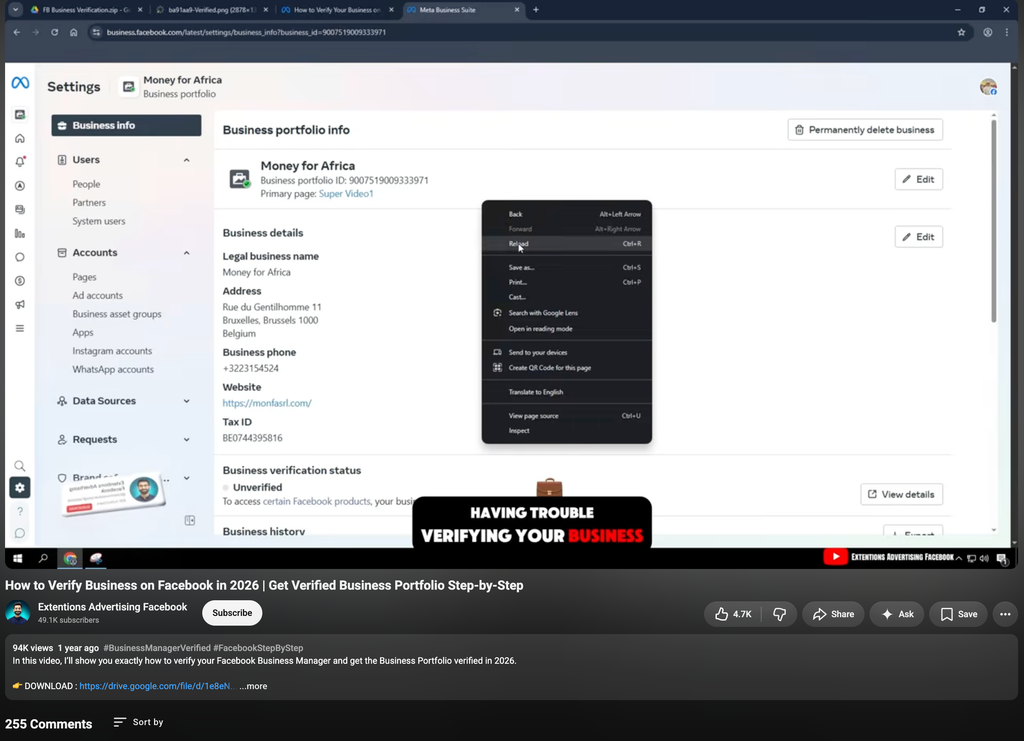
[Alt text: “Fake YouTube tutorial about Facebook business verification with a Google Drive download link in the description”. Caption: The fake tutorial. Note the “DOWNLOAD” Google Drive link and the browser tabs in the video: FB Business Verification.zip and Verified.png.]
The client downloaded the file and followed the video. They turned on Developer mode in Chrome and loaded the “verification extension.” Nothing was verified.
Then they were logged out of Facebook. When we went through the account with them, we found:
- Active sessions from Ho Chi Minh, and Phnom Penh, Cambodia, on the same day. The client had never been to either city.
- A new email address on the account from a disposable inbox service (the kind anyone can open without signing up).
- A second Meta account profile that had been added to the client’s Accounts Center. It was set up so it couldn’t be removed without re-entering a password the client no longer controlled.
[IMAGE: Hacker added this new account.png. BLUR the account name before uploading. Alt text: “Facebook Where you’re logged in screen showing unknown sessions from Sarajevo and Phnom Penh”. Caption: Facebook’s “Where you’re logged in” screen showed logins from two countries the client had never visited.]
Because the attacker had the client’s login session, Facebook treated the attacker’s devices as trusted, so the attacker didn’t need the password. The client also hadn’t turned on two-factor authentication yet. Their only protection was the login codes Facebook sent to their mobile phone. Once the attacker had added their own Meta account to the client’s Accounts Center, they could get into the account through that profile instead, so the codes on the client’s phone were no longer in the way.
Is this happening to you right now? The sooner you act, the better your chances. Tell us what you’re seeing and we’ll tell you what to do first.
Get help now >>How the fake tutorial scam works
These channels copy the format of real help videos. The steps in the video match the real Facebook menus, which is what makes people trust the download. Here is the sequence:
- Bait a frustrating problem. Business verification, disabled ad accounts, “your page will be unpublished” warnings, lost admin access. People searching for these are stressed and want a quick fix.
- Show the real Facebook interface. The video walks through real Meta Business Suite screens so the steps look correct.
- Move you off Facebook. The “fix” is always a download: a .zip on Google Drive, Mega, or Dropbox. Google Drive is popular with scammers because the link looks trustworthy.
- Get you past Chrome’s protections. Extensions from the Chrome Web Store are reviewed. To install one from a .zip, you have to turn on Developer mode and click “Load unpacked”. Doing that skips the review.
- Steal the session. The extension reads your Facebook cookies, the token that keeps you logged in, and sends them to the attacker. They can now act as you without your password or 2FA code.
- Lock you out. The attacker adds their own email, phone or Meta account, changes the recovery options, and then takes over your pages and ad accounts.
Why business owners are the target: The attacker isn’t after your profile photos. They want ad accounts with a saved payment method, pages with an audience, and business portfolios they can resell or use to run scam ads.
4 signs a YouTube tutorial is fake
One sign alone can be a coincidence. If you see two or more, close the video.
1. A random download link in the description or pinned comment
Any fix for your Facebook account happens on Facebook: facebook.com, business.facebook.com, or accountscenter.facebook.com. Meta does not ship tools as Google Drive files.
Watch out for:
- “üëâ DOWNLOAD:” followed by a Drive, Mega, Dropbox, MediaFire or shortened link
- The same link repeated in the description and pinned as the first comment
- File names like
FB Business Verification.zip,Meta Verified Tool, orAds Unlocker
2. You’re told to turn on Developer mode or install a file from an unknown source
This is the clearest warning sign. Legitimate Chrome extensions install from the Chrome Web Store with one click. If a video tells you to do any of the following, stop:
- open
chrome://extensionsand switch on Developer mode - click Load unpacked and select a folder you just unzipped
- run an .exe, .msi, .bat or .dmg file
Never install an .exe file or a Developer-mode extension from someone you don’t know. A YouTube channel counts as someone you don’t know.
3. The comments are all positive, and none of them is specific
Real tutorial comments are messy. People ask questions, say a step didn’t work, or mention that the menus look different now. Scam videos have comment sections where nearly every comment is praise:
- “Worked for me!!! ‚ù§Ô∏è”
- “You saved my group, can’t thank you enough”
- “Respect for the clear instructions üôèüôèüôè”
- “No more warnings, appreciate it”
Read the comments closely. On the video our client watched, which was about business verification, commenters thanked the creator for saving their group. These comments are written once and pasted under many scam videos, so they often don’t match the topic. Also notice that there’s no criticism at all. Comments that say “this is a scam” usually get deleted.
4. The commenters’ handles all follow the same pattern
Look at the usernames, not only the comments. Bot accounts are created in bulk, and YouTube gives each one a handle built from a name and a random suffix. On the fake video we found:
@TamaraRyan-s6w@ElizabethLittle-u3u@JulianWright-p1f@HayleyCarroll-k5n@DamienHorton-k9g
Each one is a first name, a last name, a hyphen, and three random characters. When most of the commenters follow this FirstnameLastname-x0x pattern, the comments were almost certainly posted by bots.
[IMAGE: a fake youtube video with fake comments.png. Alt text: “YouTube comment section with a pinned Google Drive download link and generic praise from bot accounts with matching handle patterns”. Caption: The pinned “DOWNLOAD” link, generic praise that doesn’t match the video’s topic, and commenters with the same handle pattern.]
Other red flags worth checking
- The channel name sounds official but isn’t. Names like “Extentions Advertising Facebook” (note the misspelling) are made to look like Meta. Meta’s real YouTube channels have years of history and never link to Drive files.
- The view and like counts are very high for a small channel. Views and likes can be bought.
- The video promises something that can’t be bought or shortcut. Business verification and Meta Verified are only done inside Meta’s own settings.
- The download name doesn’t match what the video shows. The video demonstrates one thing, and the file does something else.
| Real tutorial | Bait tutorial | |
|---|---|---|
| Where the fix happens | Inside facebook.com / Meta Business Suite | A file you download |
| Links | Meta Help Center, business.facebook.com | Google Drive, Mega, URL shorteners |
| Software | None, or Chrome Web Store only | Developer-mode extension, .exe, .zip |
| Comments | Mixed: questions, complaints, updates | All praise, often off-topic |
| Commenter handles | Varied, with real channel history | Name-Name-x0x pattern, empty channels |
Already installed the extension? Do this now
Work through these in order. Removing the extension first matters: if you change your password while it’s still installed, it can steal the new session too.
- Remove the extension. Go to
chrome://extensions, remove anything you don’t recognise, and switch Developer mode off. Delete the downloaded .zip and folder. - Scan the computer with a reputable antivirus. If you ran an .exe, assume the computer is compromised and use a different device for the next steps.
- Log out every session. Go to Accounts Center ‚Üí Password and security ‚Üí Where you’re logged in ‚Üí select all devices you don’t recognise ‚Üí Log out.
- Change your password from a clean device, and turn on two-factor authentication with an authenticator app or passkey.
- Check Contact information in Accounts Center. Remove any email or phone number you didn’t add, especially disposable addresses.
- Check Accounts Center for added profiles. Look for Meta accounts you didn’t create, and remove them.
- Check Business Settings ‚Üí People, Partners and Ad accounts for new admins and new payment methods. Contact your bank if you see ad charges you didn’t make.
- Change the password on your email account as well. The extension may have stolen sessions for other sites.
If Facebook won’t let you change the password or remove the hacker’s email, that is often Facebook’s fraud protection reacting to the activity on your account. It’s also when people tend to panic, click the wrong “Secure account” link, and lose access completely. This is the point where it helps to have someone who has handled it before.
Locked out, or can’t remove the attacker? We’ve handled this exact scam. Tell us what you’re seeing and we’ll reply with your first steps.
Tell us what happened >>How to verify a Facebook business the real way
You don’t need an extension, a download, or a paid tool. Facebook business verification is done only inside Meta’s own interface:
- Go to
business.facebook.com‚Üí Settings ‚Üí Business info. - Under Business verification status, click View details / Start verification.
- Enter your legal business name, address, phone and website exactly as they appear on your official documents.
- Upload the documents Meta asks for (business registration, utility bill, or tax document) and confirm by phone, email, or domain.
- For the blue badge, go to Settings ‚Üí Meta Verified and subscribe there. It is a paid Meta subscription, not a download.
Rule of thumb: If a fix for your Facebook account asks you to leave Facebook to download something, it isn’t a fix.
Frequently asked questions
Can a Chrome extension hack my Facebook account?
Yes. A malicious extension can read the cookies that keep you logged in to Facebook and send them to an attacker. The attacker can then open your account as you, without your password and without triggering two-factor authentication. Extensions loaded in Developer mode skip the Chrome Web Store’s review, which is why scammers ask you to use it.
Is it safe to download files from Google Drive links on YouTube?
Not from people you don’t know. Google Drive hosts files that anyone uploads, and its scanning doesn’t catch everything. A drive.google.com address only tells you where the file is stored. It doesn’t tell you who made the file or whether it’s safe.
How can I tell if YouTube comments are fake?
Look for comments that only praise the video, praise that doesn’t match the video’s topic, no questions or complaints, and commenter handles in the same pattern (a first name, a last name, a hyphen and three random characters, like @JulianWright-p1f). Click on a few commenters. Bot accounts usually have no videos, no history, and a generic profile photo.
Does Facebook have a Chrome extension for business verification?
No. Meta business verification is done only in Meta Business Suite under Settings ‚Üí Business info. Meta does not distribute verification tools as downloads, .zip files, or Developer-mode extensions.
My Facebook was hacked after installing an extension. Can I get it back?
Often, yes, especially if you act quickly. Remove the extension, log out unknown sessions, change your password from a clean device, and remove any emails, phone numbers or Meta accounts the attacker added. If Facebook blocks those changes or you’re already locked out, recovery takes more steps. That’s what Get Hacked Back helps with.
Why would hackers want a small business’s Facebook account?
Ad accounts with saved payment methods, pages with real followers, and verified business portfolios are all valuable. Attackers use them to run scam ads, resell them, or impersonate your business to your customers.
Share this with anyone who manages a Facebook page for a business. The tutorial they’re about to watch may be one of these.